

You spend hours crafting the perfect email, hit send, and then stare at a dashboard full of numbers that feel more confusing than helpful. Open rates, bounce rates, click-through rates — what do they actually mean for your business? This guide breaks down email analytics from the ground up, walking you through the tools you need, the metrics that matter, and a clear step-by-step process to turn raw data into real improvements. Whether you're running your first campaign or your fiftieth, you'll leave with a practical framework for making every send smarter than the last.
Table of Contents
- What is email analytics and why does it matter?
- Essential tools and metrics for email analytics
- Step-by-step guide: How to analyze your email campaigns
- Common mistakes and troubleshooting tips
- Measuring success and acting on insights
- Streamline your campaigns with Loomail
- Frequently asked questions
Key Takeaways
| Point | Details |
|---|---|
| Track core metrics | Focusing on open, click-through, and bounce rates quickly reveals your campaign performance. |
| Choose the right tools | Selecting analytics platforms that integrate with your workflow makes success easier. |
| Act on your data | Turn analytics insights into campaign tweaks for steady improvement. |
| Avoid common mistakes | Watch for misleading data and segment results before making major changes. |
| Review regularly | Frequent checks help you catch problems early and act on fast-moving trends. |
What is email analytics and why does it matter?
Email analytics is the practice of collecting and interpreting data from your email campaigns to understand how your audience responds. It tells you who opened your email, who clicked a link, who ignored it, and who unsubscribed. Without this data, you're essentially guessing what works.
The core metrics every marketer should know are:
- Open rate: The percentage of recipients who opened your email
- Click-through rate (CTR): The percentage who clicked at least one link inside
- Bounce rate: The percentage of emails that failed to deliver
- Unsubscribe rate: The percentage who opted out after receiving your email
- Conversion rate: The percentage who completed a desired action, like making a purchase
These five numbers paint a clear picture of campaign health. A high open rate with a low CTR, for example, tells you your subject line is working but your email body isn't compelling enough to drive action.
Why it matters: Businesses see improved ROI when they use analytics to refine their email campaigns. Data removes the guesswork and puts you in control of outcomes.
For small businesses especially, analytics are the difference between spending your marketing budget wisely and burning it. Exploring marketing-specific email analytics platforms can help you find tools built for the way you actually work, rather than forcing you into complex enterprise setups.
Essential tools and metrics for email analytics
Knowing why analytics matter leads naturally to the next step: equipping yourself with the right tools and understanding the most important metrics to track.

Here's a quick comparison of common analytics tools and what they offer:
| Tool | Key features | Best for |
|---|---|---|
| Loomail | Real-time open, click, and bounce tracking; built-in reporting | Small businesses wanting simplicity |
| Mailchimp | Audience insights, A/B testing, basic automation | Teams needing broad integrations |
| Campaign Monitor | Visual journey reporting, engagement scoring | Mid-size marketing teams |
| HubSpot | CRM-linked analytics, revenue attribution | Sales-focused organizations |
Choosing a platform that tracks advanced metrics empowers marketers to optimize campaigns without needing a data science background. The right tool surfaces insights automatically so you can act on them fast.
Beyond the tool itself, here are the metrics every marketing team should track consistently:
- Open rate (industry average hovers around 20 to 25% depending on sector)
- Click-through rate (a healthy benchmark is 2 to 5%)
- Bounce rate (keep hard bounces under 2%)
- List growth rate (are you gaining more subscribers than you're losing?)
- Revenue per email (ties campaign performance directly to business outcomes)
- Forwarding and sharing rate (a sign your content resonates enough to spread)
Pro Tip: Connect your email platform to your CRM (customer relationship management) system. This links email behavior to actual customer records, so you can see which campaigns drive real purchases, not just clicks. Reviewing analytics tools for email marketing that offer native CRM integrations can save you hours of manual data matching every month.
Step-by-step guide: How to analyze your email campaigns
Armed with the right tools and metrics, you're ready to work through a clear, repeatable analysis process. Here's how to do it.
-
Set up tracking before you send. Make sure your email platform has tracking enabled for opens, clicks, and bounces. Add UTM parameters (short tracking codes) to every link so your website analytics can connect email traffic to on-site behavior. This is a step many small businesses skip, and it costs them weeks of lost data.
-
Wait 48 to 72 hours after sending. Most opens and clicks happen within the first day, but a meaningful portion arrive in the following 48 hours. Pulling data too early gives you an incomplete picture.
-
Review your top-line numbers first. Start with open rate, CTR, and bounce rate. These three tell you immediately whether your email reached people, grabbed their attention, and moved them to act.
-
Segment your results. Break down performance by audience group, device type, and geographic location. A campaign that performs poorly overall might be doing very well with one specific segment. Segmenting audiences and reviewing heatmap data can lead to a 15% increase in engagement, which is a significant lift for any campaign.
-
Identify your best and worst performers. Look at which subject lines, send times, and content formats drove the highest CTR. Then look at what your lowest-performing emails had in common. Patterns emerge quickly.
-
Document your findings. Keep a simple log of each campaign's key metrics. Over time, this becomes your most valuable asset because it shows trends that a single campaign snapshot never could.
"Audience feedback is as important as analytics. Numbers tell you what happened. Talking to your subscribers tells you why." This combination of quantitative and qualitative insight is what separates good marketers from great ones.
Pro Tip: Review your campaign data every week, not just after major sends. Sudden drops in open rate or spikes in unsubscribes often signal a deliverability issue or a content misstep that you can fix quickly if you catch it early. Following email campaign best practices consistently makes this weekly review much faster.
Common mistakes and troubleshooting tips
Once you're analyzing data regularly, watch out for these common mistakes that can lead you to the wrong conclusions.
| Mistake | Cause | Solution |
|---|---|---|
| Misreading bounce types | Confusing soft bounces (temporary) with hard bounces (permanent) | Remove hard bounces immediately; retry soft bounces once |
| Celebrating high open rates prematurely | Apple Mail Privacy Protection inflates open data | Cross-reference with CTR and conversion data |
| Making changes after one send | Single-campaign data is not statistically reliable | Wait for at least 3 to 5 sends before drawing conclusions |
| Ignoring unsubscribe reasons | Treating unsubscribes as a vanity metric | Use exit surveys to capture why people leave |
| Overlooking mobile performance | Desktop-focused design hurts mobile users | Always preview and test on mobile before sending |
Misreading bounce rate data can lead to poor deliverability decisions, like keeping bad addresses on your list or suppressing valid contacts unnecessarily. Both outcomes hurt your sender reputation over time.
Here are warning signs that your data may have quality issues:
- Open rates above 60% (likely inflated by privacy protection tools)
- Zero bounces across a large list (tracking may not be configured correctly)
- CTR higher than open rate (a technical error in your tracking setup)
- Sudden 50% drop in open rate with no change in send behavior (possible spam folder issue)
Pro Tip: Always segment your data before making broad changes to your campaigns. A problem that looks universal often affects only one audience segment, one device type, or one geographic region. Reviewing common analytics mistakes before you act can save you from fixing something that isn't broken.
Measuring success and acting on insights
After troubleshooting, it's time to measure whether your improvements are actually working and turn your analysis into smarter campaigns.
Start by establishing a baseline. Before you change anything, record your current average open rate, CTR, and conversion rate. This gives you a reference point so you can tell whether a new subject line strategy or a different send time actually moved the needle.
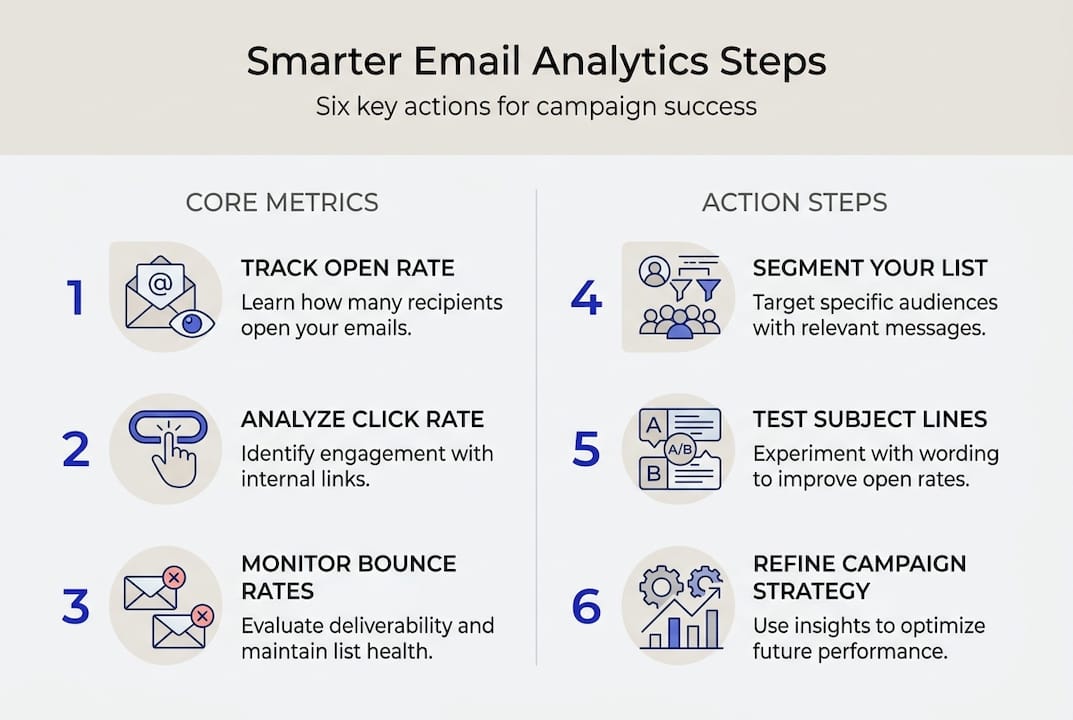
Marketers who set measurable goals see up to 27% greater campaign effectiveness than those who don't. Setting a specific target, like increasing CTR from 2.1% to 3.5% over 60 days, forces you to make deliberate decisions rather than random tweaks.
Here are quick-win actions you can take based on common analytics insights:
- Low open rate: Test two or three new subject line styles (question-based, number-based, curiosity-driven) over your next sends
- Low CTR: Simplify your email body, reduce the number of links, and make your primary call-to-action button larger and more visible
- High unsubscribe rate: Reduce send frequency or add a preference center so subscribers can choose how often they hear from you
- High bounce rate: Run a list cleaning process to remove invalid addresses before your next campaign
- Low conversion rate: Align your email content more tightly with the landing page it links to
The key is to change one variable at a time. If you rewrite your subject line, redesign your layout, and change your send day all at once, you won't know which change drove the improvement. Patience and discipline in testing are what using analytics to improve results actually looks like in practice.
Streamline your campaigns with Loomail
Now that you're equipped to master analytics, using a purpose-built tool can help you go further, faster. Loomail gives you real-time visibility into open rates, clicks, and bounces the moment your campaign goes out, without requiring you to connect external SMTP services or wrestle with complex dashboards.
The Loomail platform is built specifically for small businesses and marketing teams who want actionable data without the overhead of enterprise tools. You can segment your audience, track campaign performance, and act on insights all in one place. Loomail also handles deliverability protections like domain warmup and bounce control, so your emails land in inboxes, not spam folders. Check out the available Loomail plans to find the right fit for your team size and send volume.
Frequently asked questions
What is the most important email analytics metric to track?
Click-through rates reflect how well your emails prompt action, making CTR the single best indicator of engagement and campaign effectiveness. Open rate matters too, but CTR tells you whether your content actually moved people.
How often should I review my email analytics?
Monitor results within 48 to 72 hours of each send, then review trends weekly or monthly to spot patterns across campaigns. Regular review lets you catch deliverability issues and content problems before they compound.
Why do my open rates seem unusually low?
Subject lines and sender reputation are the two biggest factors affecting open rates. Low rates often also point to list quality issues, like sending to old or unengaged contacts.
How can I use analytics to improve my campaigns?
Reviewing metrics like bounce rates and conversions helps you refine list segments and adjust content for better results. Analytics inform every decision, from what you write to when you send it.